
Introduction
A big consideration to weigh when joining a startup is benefits. Much has changed in the last decade as startup compensation and benefits have come more in line with traditional roles in Big Tech, Finance, and Consulting. While you would be hard-pressed to find a startup with benefits that matched Google’s, the gap is not as extreme as it may have been 10+ years ago. With the proliferation of private capital, more individuals are working in startups, and now more service providers are catering specifically to this segment. 401ks are no exception.
One of the historical downsides of joining a startup had been that you probably would lose access to a 401k plan. You gave up the nice 401k plan with a 3% (or more) match for the lottery ticket of startup equity. If it worked out at the startup, great; if not, you missed several years of 401k contributions that could be compounding year over year.
When I joined Loop Crypto in early 2022, I knew that the world had changed slightly and that more startups were beginning to offer 401k plans, even as early as the seed stage level. You might expect to find 401k plans and even some matching programs at late stage startups, but you usually did not see these types of offerings at Seed or Series A startups where there were less than 25 employees. We were less than 10 at Loop, but I wanted to see if we could make a 401k program work. We were looking to attract strong, more-senior talent (10+ years of experience) where benefits like healthcare and 401ks mattered a lot.
It took me hours of research and numerous conversations with other startup operators to land on a solution. Here’s my attempt to save you a little time and provide you with my framework. Please note that I was looking at 401k providers over 2 years ago, so some things have changed in the market; however, the analysis framework still holds and almost all of the key players are the same.
Framework for assessing providers
When I set out on this project at Loop Crypto, we were not sure yet how we wanted to design our 401k plan and if we even wanted to offer one just yet. Feedback from other our network of other startup operators quickly narrowed the list of potential 401k providers that were suitable for small startups. You can find the list of 401k providers evaluated below.
When analyzing providers, I used the following evaluation criteria. They are listed in order of importance.
- Low cost for our startup to administer
- Low cost for our employees
- Ability for employees to invest in well-known and low-cost index funds
- Ability to integrate with payroll provider or future PEO to avoid any manual admin work
- Customer support reputation
Before we dive in further, it’s important to note that I also took a quick look at SEP-IRAs. These are typically recommended for small business owners or the self-employed. The issue with them is that the employer is the only one able to contribute. An employee cannot self-fund the SEP-IRA. For early stage startups, it’s unlikely that you’re profitable and can really contribute to employees 401ks at this point. What you really want is the ability to let your employees contribute to tax-advantaged retirement accounts.
Overview of providers reviewed
A basic Google Search and an email thread with a few operations friends, led to the following list of 401k providers to review: Betterment, Guideline, Human Interest, and Save Day. I took a quick glance at Charles Schwab, but I largely avoided looking at large legacy 401k providers because most of them have minimum employee counts and are not digitally focused.
I did desk research on all the players in the table below and then had live demos with Human Interest, Guideline, and Betterment. I did not meet with Slavic 401k, but I learned more about them through a conversation with Justworks as they are the preferred 401k partner of Justworks.
Out of the 3 demos, Guideline’s was the best. The structure of the demo call stood out to me because they started by asking us about what Loop does and what our needs were. Betterment did this to a certain extent as well. The Guideline pricing structure was also extremely clear and straightforward on the call. I clearly understood the distinctions between their pricing tiers whereas with Betterment and Human Interest, it was harder to follow why I would use the middle tier vs. the bottom tier.
As a side note, I tried to look at Wealthfront but discovered that they do not offer a 401k option for companies. They only accommodate rollovers into IRAs. This may have changed since I last did my research, so you may want to add Wealthfront to your list as well.
One other thing to think about is to make sure you really understand what it means for a 401k and payroll provider to be integrated. You will hear the terms 360 and 180 integrations. A 360 integration means that the 401k provider has a 2-way API connection with the payroll provider. A 180 integration means there is only a one-way integration, so some type of manual effort might be required if an employee were to change their contribution percentage in the 401k provider platform.
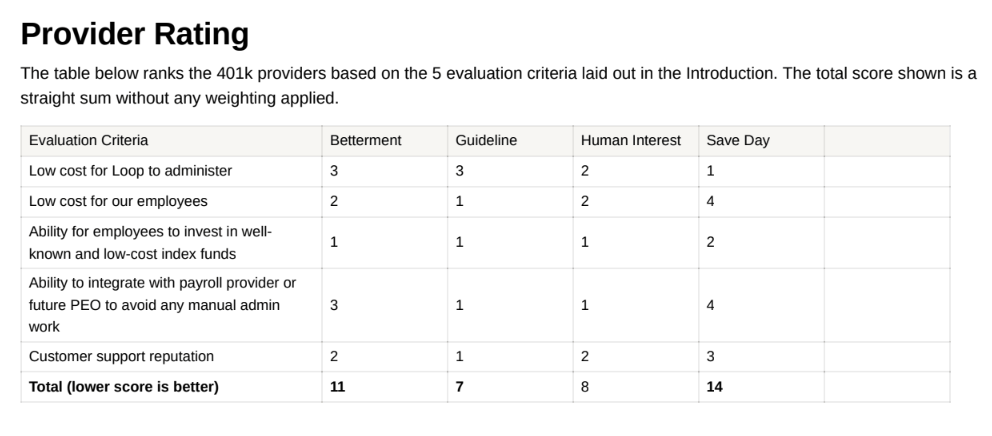
At the end of my research, these were my ratings. I share them for transparency, but obviously take this with a grain of salt and do your own research especially as things can change.
Addendum on Safe Harbors vs. traditional 401ks
One question that came up as I looked into providers is whether we would want to offer a Safe Harbor. I had heard that term but had no idea what it meant. To save you some research, here’s what you need to know…
A Safe Harbor plan is more of an out-of-the-box solution where you can avoid the hassle of IRS compliance testing. With a Safe Harbor, you the employer must have a matching program (usually with 4% as the minimum). Having the match is what exempts you from IRS compliance testing because it shows that you are incentivizing all employees to save for their retirements. The general goal of the IRS compliance testing is to ensure that the 401k program at any given company is not simply helping the top earners or executives; it should be promoting retirement saving among all employees.
We ultimately decided not to use a Safe Harbor plan. I think for most early-stage startups, implementing a matching program is simply not in the budget, but kudos to you if it is. If you don’t utilize a Safe Harbor, one of the benefits of using a platform like Guideline is that it automatically runs the compliance testing for us and gives me a notification if our plan ever gets out of balance. With a small team, it’s fairly easy to keep tabs on this. To recap though, here are the pros and cons of a Safe Harbor:
Pros:
- Cheaper offering – For Guideline and Betterment, we could have used a cheaper tier if we had a Safe Harbor. They charge you less because they do not have to deal with the compliance monitoring for you. Of course run the full costs though for your business. You may save a couple bucks a mont on the guideline subscription, but then you’re paying for a costly match program.
- Reduced compliance concerns – Without a safe harbor, we need to ensure that our C-suite does not utilize the 401k plan significantly more than average employees. For example, if the average employee is saving 4% in a 401k, then our C-Suite could only save a max of 6%. There are some other rules as well.
- Benefit to attract talent – More money for your employees is always nice and attracts talent who may be more willing to leave a cushy corporate job. 😊
Cons
- Forced match of 4% from day 1 of plan initiation – As I mentioned, this is expensive for an early stage startup. I figured we could switch to a Safe Harbor down the road when we’re ready to match.
- Set up times are limited to certain time of year – You need to have a Safe Harbor set up by October 1st at the latest for a given calendar year because you need to be able to contribute to it for at least 3 months.
More resources
I hope this was a helpful starting point for those researching 401k options for their startups. Here are some more resources to dig deeper on this topic:
- Good place to start your research is either this article from Stripe or this other article
- Explanation of the IRS compliance testing
- Here is a more in-depth article on Safe Harbors

 Jeff Cangialosi
Leave a comment